Field Notes: capture observations the moment they happen
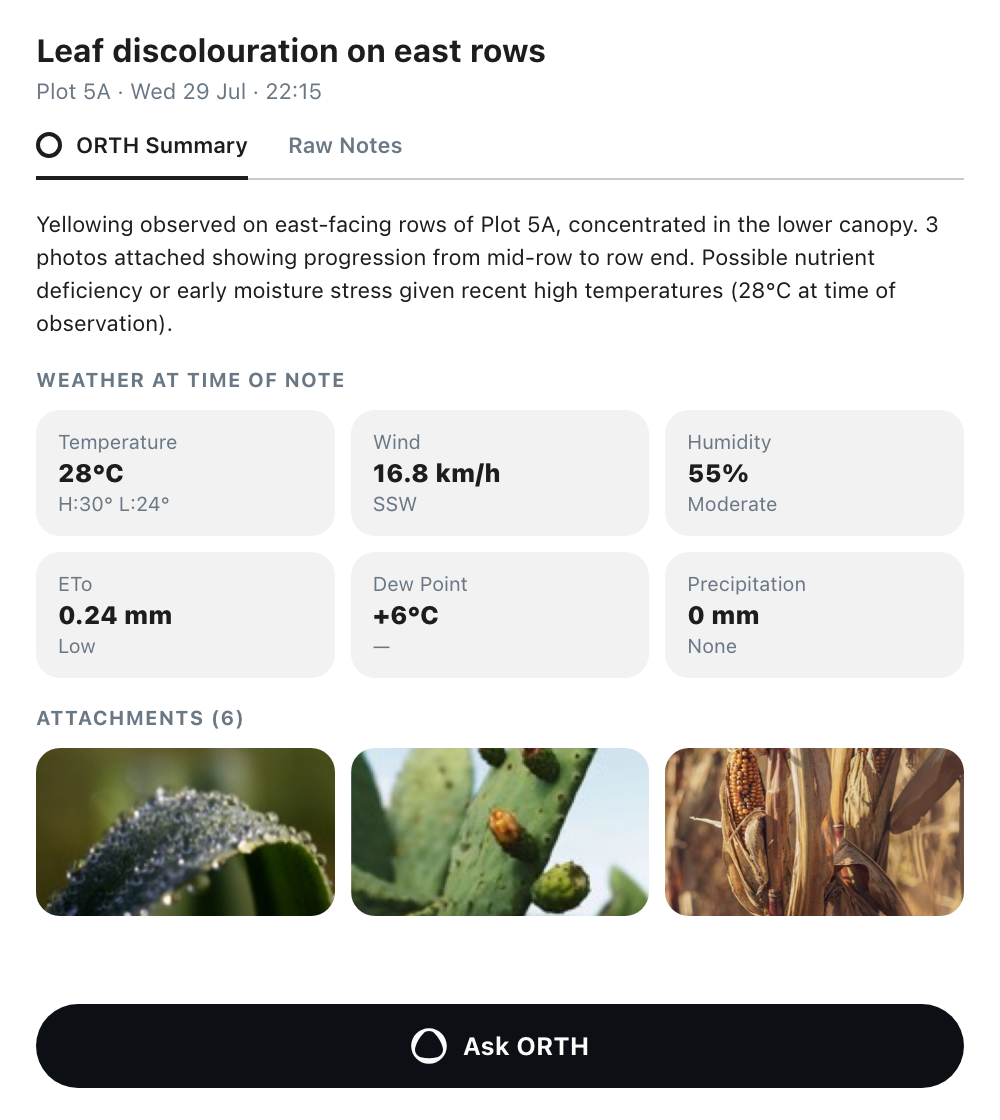
Feature 01Capture built for speed A full screen capture sheet opens from the home screen quick action pill, plot cards, plot profiles and the plus menu. Dictation is the main input and transcribes in real time, and you can type or edit at any point. Photos, camera shots, scans and files attach inline and inherit the note’s plot. Drop a pin on the map to record the exact spot, inside or outside the plot boundary. Feature 02ORTH summary Every saved note is cleaned up and formatted by ORTH, which turns raw dictation into readable, structured content. The cleaned summary and the original notes stay available side by side. Feature 03Weather at the time of the note Each note shows the conditions at the moment of the observation: temperature with high and low, wind speed and direction, humidity, ETo, dew point and precipitation. Changing the note’s date or time refreshes the data to the historical conditions of that moment, so you can read each observation against the weather behind it. Feature 04Ask ORTH about a note From any note, Ask ORTH opens a new chat with the note attached and its plot selected. ORTH answers from what you saw in the field, and you can remove the note context at any time to carry on as a general conversation. Feature 05Browsable and editable All notes collect in a searchable list at farm and plot level, filterable by plot, crop, date and author. Title, text, plot, pin, date and attachments stay editable after saving, so a rushed dictation or a wrong plot is corrected without starting over.